Places now get the same treatment as characters and research. A setting sheet starts with an at-a-glance block, then sections for sensory details, layout and landmarks, history, who is found there, the rules of the place, its role in the story, the scenes set there, and notes. Choose a type — building, room, city, region, wilderness, vehicle, realm and more — from the pill under the title.
Like every other sheet you can start from the template or from a blank page, add and remove sections, and it appears in search, quick-jump, the corkboard and compile like any other document.
How to use it
In the binder, right-click and choose Add Setting (or New Setting from the binder's menu). Pick the structured sheet or a blank page, exactly as you would for a character.
Set the type from the pill under the title, then fill in the sections that matter for this place. Sections you do not need can be removed with the Remove control beside their heading, and "Add section" at the bottom gives you a fresh one.
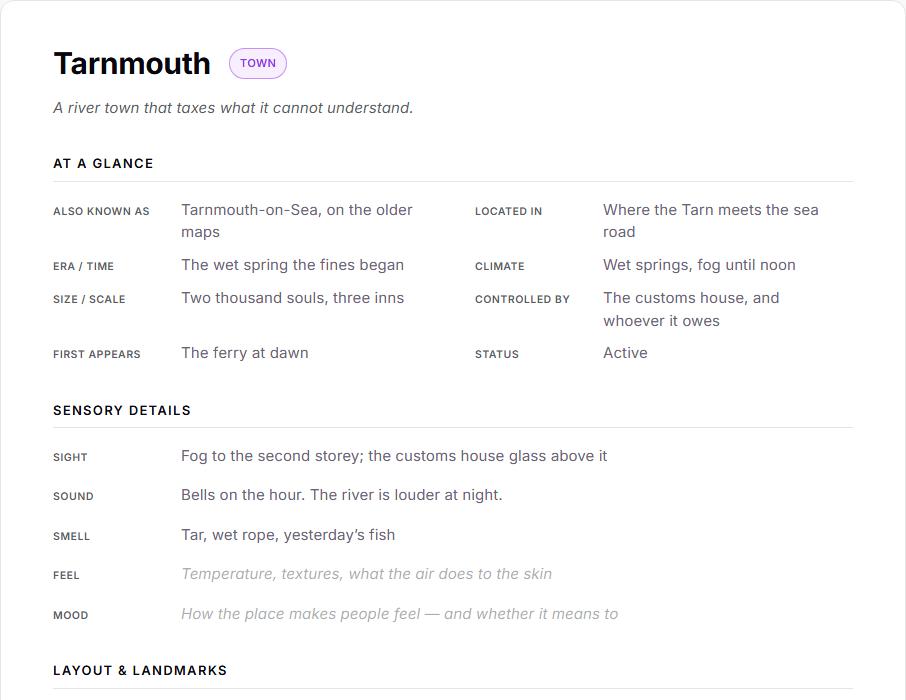
Use the italic line under the title for the place in one sentence, and dismiss the starter notice at the top once you no longer need it — nothing in the template is permanent.
Setting sheets show up under a map-pin icon in the binder, in the corkboard's "+ Setting" button, and in Quick Jump, so a place is never more than a keystroke away.