Insanitomeium now keeps automatic snapshots of every document as you write, so an accidental delete — or an over-enthusiastic rewrite — is never permanent.
Snapshots are captured quietly in the background while you work. Open the version history at any time to read an earlier draft and restore it with one click; restoring is itself reversible, so you can never make things worse by looking.
How to use it
Open the ⋯ menu at the right end of the editor toolbar and choose Version history.
Click any snapshot in the list to preview that draft's text.
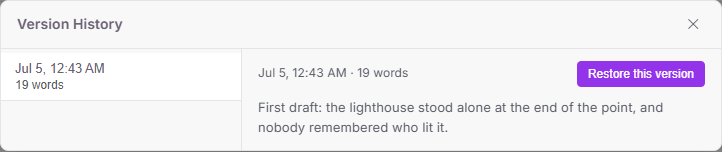
Click "Restore this version" to bring it back. Your current text is snapshotted first, so a restore can always be undone the same way.
There are also Undo and Redo buttons at the left end of the toolbar for quick reversals while writing.