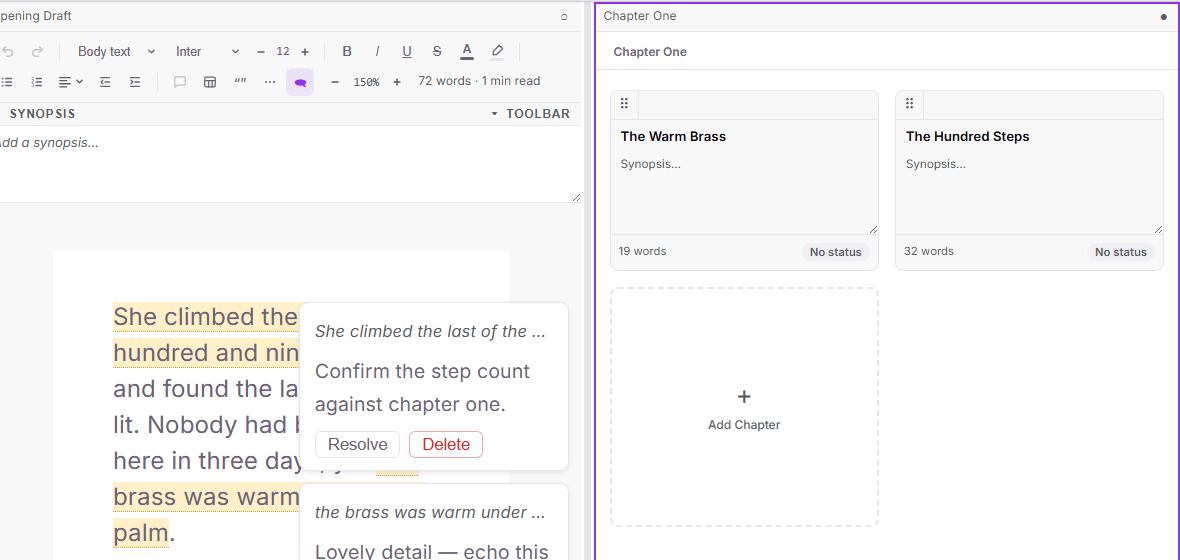
The split editor grew up: drag the divider to resize the two panes exactly how you like, and open a corkboard in one pane while you write in the other.
Beta-reader share links can now include your margin notes as numbered endnotes — strictly opt-in, so your private notes stay private unless you tick the box.
Annotations got a polish pass too: click any note to edit it, cards line up beside their text and never overlap, and the label picker on corkboard cards opens right where you clicked. On phones, Share and What's New are now in the menu.
How to use it
Click Split in the top menu, then drag the divider between the panes to resize them. Double-click it to reset to an even split.
To see a corkboard beside your text, focus the second pane and select a folder or chapter in the binder while corkboard view is on.
When creating a share link, tick "Include annotations" to add your notes as numbered endnotes at the end of each chapter. Leave it unticked and they are stripped as always.
Click any margin note's text to edit it in place; Resolve dims it and Delete asks before removing.